FTP Links
FTP Upload Instructions for Windows Users
1. Open Windows Explorer
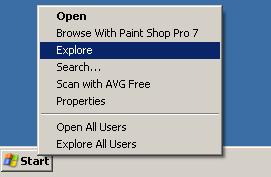
Move the cursor over the Start menu button and right-click. A menu will open with a list of options including Open Windows Explorer — left-click on this. Windows XP users will click on Explore.
2. In the Windows Explorer address bar type:
ftp2.specprint.com
Dismiss and close any warnings if necessary.
3. On the top menu bar click on: File
In the File drop-down box click Login As.
Windows 7 users may have to hold the ALT key for the menu to appear.
4. When the Log In box opens:
Username: spec@specprint.com
Password: SpecPrint00
Now you can drag and drop files into Windows Explorer and they will upload to the FTP site.
If the username and password won't allow you to connect, or if you are using another operating system, please call us. To obtain a private username and password from SpecPrint please call 410-561-9600 or 1-800-969-7732.